
What CI/CD Actually Means
Let’s strip it down. Continuous Integration (CI) is the habit of developers frequently pushing small code changes to a shared repository often several times a day. Each change gets automatically tested and built, so issues are caught early, not weeks later. It’s about avoiding death by merge conflict and making sure new code plays nice with what’s already there.
Continuous Deployment (or Delivery the terms vary slightly depending on setup) picks up where CI leaves off. Once code passes tests, it’s automatically shipped to production (that’s deployment) or staged for a human to hit the go button (that’s delivery). Either way, CD gets code from dev’s laptop to real world users faster, with fewer snags.
CI/CD isn’t just a technical setup it’s baked into how modern teams build software. It supports shorter release cycles, faster feedback from users, and tighter collaboration across teams. With today’s development pace, manual releases and cowboy coding don’t cut it. CI/CD is the safety net and the launchpad.
Bottom line: If your software doesn’t ship fast, someone else’s will. CI/CD keeps you in the game without burning out your team.
The Core Benefits
CI/CD isn’t just another buzzword it’s about making better software, faster. One of the clearest wins is speed: when integration and deployment happen continuously, changes go live quicker with fewer bugs. That means less waiting, fewer firefights, and more time to iterate.
It also slashes manual effort. Instead of relying on someone to remember every deployment step, automated pipelines handle the heavy lifting. With that comes fewer mistakes and more consistent rollouts. In a space where one wrong move can tank production, reliability matters.
Then there’s feedback. CI/CD lets teams ship small changes and get immediate user insights. When something doesn’t land, you’re not stuck waiting weeks to pivot. You course correct in real time.
And scale? That’s where things really shine. Whether you’ve got 100 users or a million, a solid CI/CD setup means your system expands without crumbling. It’s about stability without slowing down code flows, tests keep pace, and deployment doesn’t skip a beat.
Key Components of a CI/CD Pipeline
CI/CD isn’t a single tool or script it’s a stitched together process. At the foundation is source control, usually Git. Teams use workflows like feature branching or GitFlow to isolate code changes, then merge via pull requests. This keeps updates organized and traceable, and makes it easier to review, test, and roll back when needed.
Once code hits the repository, automated testing kicks in. Unit tests catch the basics, integration tests make sure systems work together, and some setups include end to end testing for key flows. These tests run every time you push new code or open a pull request so there’s less room for surprise bugs.
After testing, the pipeline handles the build: compiling code, bundling assets, setting environment variables. Then comes deployment. Most teams release in stages: first to dev (internal), then staging (near production), and finally production (live). This gives you time to spot issues before customers do.
Things can still break. That’s where rollback and failover come in. A robust CI/CD setup includes versioned releases, quick switch rollback scripts, or blue green deployments so that production isn’t left hanging. In short: build pipelines with a parachute included. If things go sideways, you want a way back fast.
DevOps Culture and CI/CD
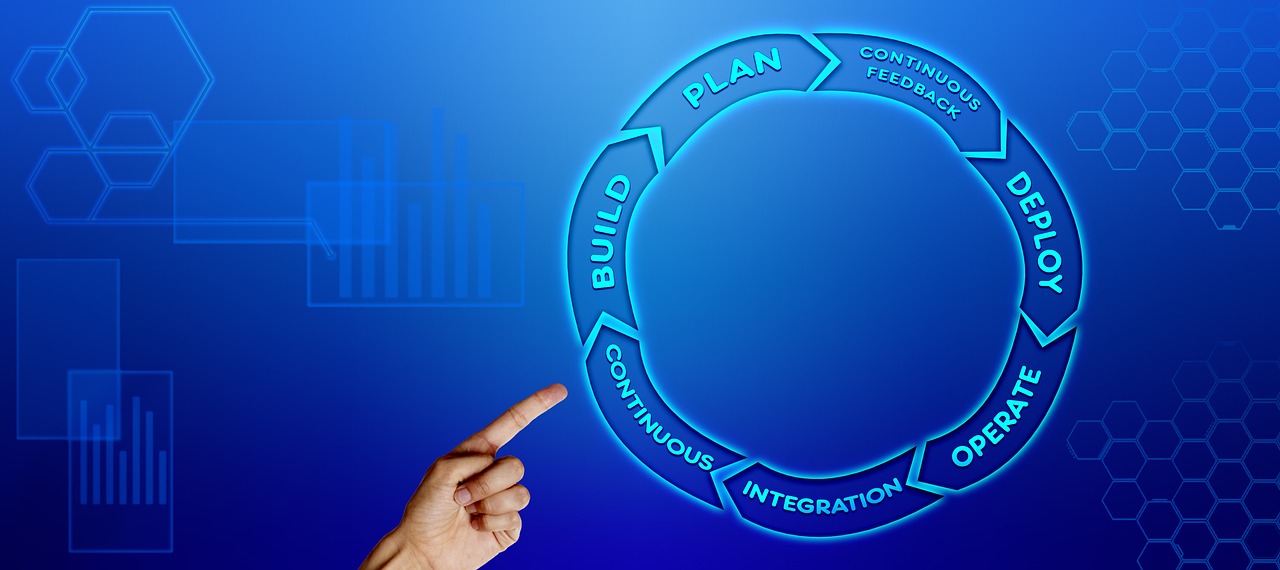
DevOps isn’t just a buzzword it’s a shift in responsibility and communication. Developers and operations teams don’t operate in silos anymore. On the ground, this looks like shared dashboards, common Slack channels, and a joint focus on uptime, speed, and customer feedback. CI/CD is the glue holding it together: automated pipelines mean developers can ship code without throwing it blindly over the wall, and ops can trust the integrity of every build.
CI/CD aligns naturally with Agile development. Agile calls for rapid iteration and continuous feedback, and CI/CD delivers on that promise. You get faster release cycles, leaner sprints, and fewer late game surprises. Testing happens automatically. Bugs get caught earlier. Teams don’t wait months to see if something works they find out today.
On the flip side, waterfall methods are dragging. In a waterfall setup, you plan everything up front and deliver at the end. That worked when software shipped in boxes. Now, it’s a bottleneck. The rule of thumb for modern teams: if your release cycle is long, your learning cycle is longer and that’s the real cost.
If you’re weighing Agile versus Waterfall, check out this breakdown: Agile vs Waterfall Choosing the Right Development Methodology.
Common Tools in the Stack
There’s no shortage of CI/CD tools out there, but a few have pulled ahead of the rest. Jenkins has been the OG in automation for years extensible, powerful, and a little clunky if you don’t tame it. For teams who want something more integrated, GitLab CI offers pipelines built right into the repo, making it feel seamless. CircleCI brings speed and simplicity, which is why a lot of startups still swear by it. GitHub Actions, though, is the rising star. If your code lives on GitHub (let’s be honest it probably does), Actions lets you trigger tests, builds, and deploys straight from commits with almost zero setup.
On the container front, Docker is still essential. It packages your app and all its dependencies into one neat box no more “it works on my machine” headaches. Kubernetes picks up from there, managing container orchestration at scale. Think of it as your traffic controller and auto scaler in one. Helm plays support, making Kubernetes apps easier to configure and deploy through templated charts.
Then you’ve got monitoring and logging the eyes and ears of your pipeline. Prometheus + Grafana is a popular pair for performance metrics. For logging, teams often lean on tools like ELK stack (Elasticsearch, Logstash, Kibana) or Fluentd depending on volume and budget. Without visibility, you’re flying blind. With it, you can catch bugs before your users do and recover fast when things break.
In the end, choose the tools that match your team’s size, speed, and experience. There’s no perfect stack just the one that gets out of your way and lets you ship clean code, fast.
Biggest Mistakes to Avoid
One of the fastest ways to blow up your CI/CD pipeline is to automate a bad process. If your workflow is already messy hardcoded configs, manual database tweaks, or unclear merge policies automating it won’t fix anything. It just lets broken code ship faster. Before you automate, clean house.
Skipping tests is another common trap. Unit tests catch the bugs early. Integration tests catch the bugs that matter. Leaving either out breaks the fragile trust between developers and deployments. You might save five minutes now and spend five hours debugging prod later.
Finally, deploying without observability is like flying blind. If you can’t see what’s working, what’s failing, or what users are experiencing, you’re guessing. Logs, metrics, and actionable alerts aren’t extras they’re your safety net. Build them in from day one, not as an afterthought. In CI/CD, what you can’t see can absolutely hurt you.
Final Notes for First Time Devs
If you’re just stepping into the CI/CD world, don’t try to overhaul everything at once. Start where it counts: automate simple build and test flows. Get those right before moving into heavier stages like deployment. Small wins compound fast, and early automation gives you breathing room to improve without stress.
Pick tools that make sense for your team. Don’t get pulled into tool wars or trend chasing. If you’re a two person crew, something lightweight like GitHub Actions or CircleCI might be smarter than setting up Jenkins and managing your own runners. The goal isn’t to flex it’s to ship better, faster.
Most importantly, treat CI/CD as a habit, not a task list. It’s not about having the “right setup” it’s about how often and confidently you can push working code. CI/CD only delivers if you commit to it as a way of working, not just a pipeline diagram.
Still deciding how to structure your team or approach? Weighing agile vs waterfall approaches might help: Agile vs Waterfall Choosing the Right Development Methodology.
 Nancy Shockleyear has opinions about technology news and updates. Informed ones, backed by real experience — but opinions nonetheless, and they doesn't try to disguise them as neutral observation. They thinks a lot of what gets written about Technology News and Updates, Gadget Reviews and Comparisons, Expert Opinions is either too cautious to be useful or too confident to be credible, and they's work tends to sit deliberately in the space between those two failure modes.
Reading Nancy's pieces, you get the sense of someone who has thought about this stuff seriously and arrived at actual conclusions — not just collected a range of perspectives and declined to pick one. That can be uncomfortable when they lands on something you disagree with. It's also why the writing is worth engaging with. Nancy isn't interested in telling people what they want to hear. They is interested in telling them what they actually thinks, with enough reasoning behind it that you can push back if you want to. That kind of intellectual honesty is rarer than it should be.
What Nancy is best at is the moment when a familiar topic reveals something unexpected — when the conventional wisdom turns out to be slightly off, or when a small shift in framing changes everything. They finds those moments consistently, which is why they's work tends to generate real discussion rather than just passive agreement.
Nancy Shockleyear has opinions about technology news and updates. Informed ones, backed by real experience — but opinions nonetheless, and they doesn't try to disguise them as neutral observation. They thinks a lot of what gets written about Technology News and Updates, Gadget Reviews and Comparisons, Expert Opinions is either too cautious to be useful or too confident to be credible, and they's work tends to sit deliberately in the space between those two failure modes.
Reading Nancy's pieces, you get the sense of someone who has thought about this stuff seriously and arrived at actual conclusions — not just collected a range of perspectives and declined to pick one. That can be uncomfortable when they lands on something you disagree with. It's also why the writing is worth engaging with. Nancy isn't interested in telling people what they want to hear. They is interested in telling them what they actually thinks, with enough reasoning behind it that you can push back if you want to. That kind of intellectual honesty is rarer than it should be.
What Nancy is best at is the moment when a familiar topic reveals something unexpected — when the conventional wisdom turns out to be slightly off, or when a small shift in framing changes everything. They finds those moments consistently, which is why they's work tends to generate real discussion rather than just passive agreement.